How to Build an AI Agent: Tools, Platforms and Steps That Work

If you want to know how to build an AI agent, the honest answer is that it is easier than it was two years ago, but it is still easy to get wrong. We build AI agents for businesses, and most problems we see come from the same place. People pick a tool first and decide the job later.
This guide shows you how to create an AI agent from scratch, which AI agent development tools and AI agent platforms are worth looking at, and what it costs. We also use customer support automation as the main example, because it is the first thing most companies want to automate.
Quick summary
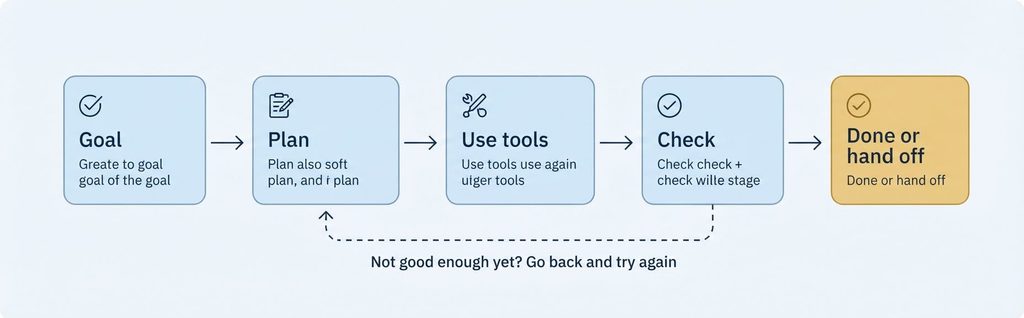
- An AI agent is software that takes a goal, decides the steps, uses tools and checks its own work.
- Start with one small job, not a big all in one assistant.
- Use a no-code AI agent builder for simple tasks and a framework for custom work.
- Always add testing and a human handoff before you go live.
What is an AI agent?
A chatbot answers a question. An AI agent does a task. If a customer writes in and says their parcel has not arrived, a chatbot gives a generic reply. An agent looks up the order, checks the tracking status, writes a clear answer and, if needed, starts a refund for a person to approve.
Anthropic, the company behind Claude, makes a useful split in its engineering guide on building effective agents. Workflows follow a fixed path written in code. Agents decide their own path and tools as they go. Both are called agentic systems, and many good products are really workflows, which is fine.
Do you really need an agent?
Anthropic advises finding the simplest solution possible and only adding complexity when you need it. Sometimes that means not building an agent at all. A single well written prompt with some search can solve a lot. We tell clients the same thing. If a fixed workflow does the job, use it. It is cheaper, faster and easier to debug.
Build a real agent when the steps change from case to case, when the task needs several tools, and when a wrong answer can be caught and fixed.
How to build an AI agent step by step
1. Pick one clear job
Write the job in one sentence. For example: “Answer order status and returns questions for our online store and pass anything else to a person.” If you cannot say it in one sentence, the scope is too big.
2. Choose the model
The model is the brain. Large models from OpenAI, Anthropic and Google are the common choices. Bigger models reason better but cost more per message. Many teams use a strong model for hard steps and a smaller, cheaper one for simple steps like sorting tickets.
3. Give it tools
Tools are how an agent acts. Examples are searching your help centre, reading an order, creating a ticket or sending an email. Keep each tool simple with a clear name and description. Anthropic’s guidance on tools makes the point that tool design deserves as much care as the prompt, because the model relies on those descriptions to decide what to do.
4. Add your knowledge
Connect your help articles, product pages, policies and past tickets. This is often called retrieval. It lets the agent quote your real policy instead of guessing. Keep the content clean and up to date, because an agent is only as good as the information behind it.
5. Write clear instructions
Tell the agent who it is, what it can do, what it must never do, and when to hand over to a human. Short, direct instructions work better than long ones. Add a few real examples of good answers.
6. Test with real cases
Collect 50 to 100 real questions and run them through the agent. Mark each answer as good or bad. Fix the instructions or tools, then run the same set again. This test set is the most valuable thing you will build, and you will reuse it every time you change the agent.
7. Add safety and human handoff
Set limits. Refunds above a certain amount need approval. Angry or sensitive messages go straight to a person. The OpenAI Agents SDK has built in support for guardrails and handoffs between agents, which shows how normal these controls are in production systems.
8. Launch small, then watch it
Start with a small share of traffic. Read the conversations every week. Track how many tickets the agent solves without help, how many it hands off and how customers rate it. Then widen it step by step.
AI agent development tools and frameworks
If you or your developer want full control, these are the main options.
- OpenAI Agents SDK. A lightweight framework for multi agent workflows. The official docs say it needs Python 3.10 or newer and installs with pip install openai-agents. It covers tools, handoffs, guardrails and tracing, and a TypeScript version is also available.
- Claude Agent SDK. Built by Anthropic, based on the same approach used in Claude Code. It gives agents access to a computer, files and custom tools.
- Google Agent Development Kit. An open source toolkit from Google for building and deploying agents.
- LangGraph and CrewAI. Popular open source frameworks for stateful and multi agent setups.
- Model Context Protocol (MCP). An open standard for connecting agents to tools and data, now supported by many products.
One note from Anthropic that we agree with: you can start by calling the model API directly, since many patterns take only a few lines of code. If you use a framework, make sure you understand what it does underneath.
AI agent platforms: no-code and low-code options
If you do not want to write code, AI agent platforms let you drag and drop. They are fast to start, but you give up some control over data and behavior.
| Option type | Examples | Best for | Typical monthly cost |
|---|---|---|---|
| No-code agent builders | n8n, Zapier Agents, Make | Simple tasks and app automation | About 20 to 200 USD (16 to 160 GBP) |
| Cloud agent platforms | Microsoft Copilot Studio, Google Vertex AI Agent Builder, Amazon Bedrock Agents | Larger companies with existing cloud accounts | Usage based, often 200 to 2,000 USD (160 to 1,600 GBP) |
| Custom build with a framework | OpenAI Agents SDK, Claude Agent SDK, LangGraph | Private data, special rules, custom products | Model and hosting fees, often 100 to 1,500 USD (80 to 1,200 GBP) |
These figures are rough ranges to help you plan. Vendors change pricing often, so always check the official pricing page before you commit.
Example: customer support automation with an AI agent
Customer support is where agents pay back fastest. Most teams get the same questions every day: where is my order, how do I reset my password, can I return this. An agent can handle these around the clock and pass the hard ones to your team with a short summary, so nobody asks the customer to repeat themselves.
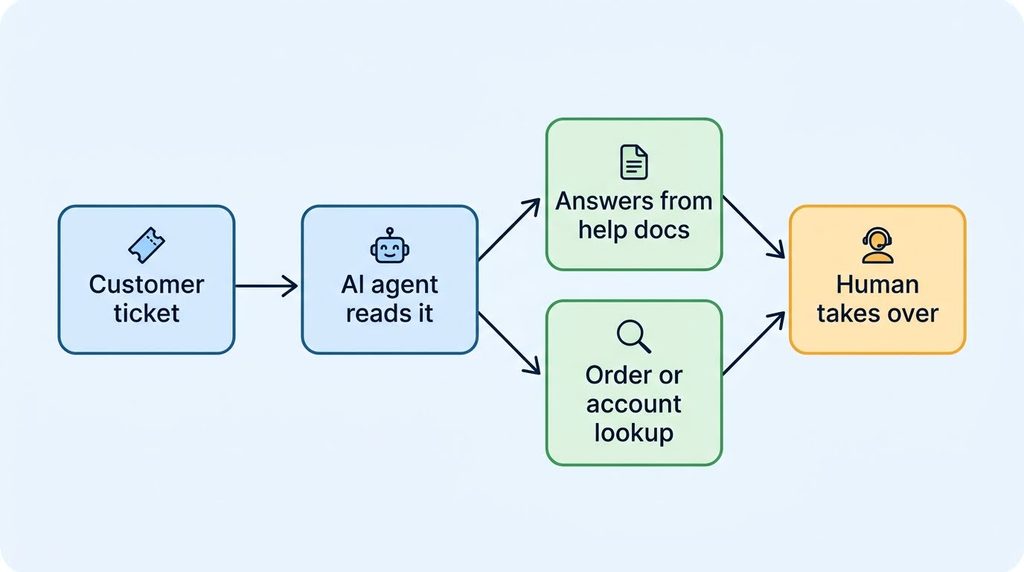
A typical setup connects the agent to your help desk, your knowledge base and your order system. It answers from your documents, looks up account details when needed and creates a ticket for anything it cannot solve. If you want to see how this works for a real business, take a look at our AI customer support agent service.
How much does it cost to build an AI agent?
| Project size | What you get | Build cost |
|---|---|---|
| Starter | One task agent, one or two tools, basic testing | 3,000 to 6,000 USD (2,400 to 4,800 GBP) |
| Standard | Support agent with help desk, knowledge base and human handoff | 6,000 to 15,000 USD (4,800 to 12,000 GBP) |
| Advanced | Several agents, custom dashboards, security review | 15,000 USD and up (12,000 GBP and up) |
On top of the build you pay for model usage and hosting each month. A good developer will estimate this from your expected volume before you start.
Common mistakes to avoid
- Trying to automate everything at once.
- Skipping the test set and judging by a few good looking chats.
- Giving the agent too many tools, which confuses it.
- Letting it take big actions like refunds with no approval step.
- Forgetting data privacy rules such as GDPR in the UK and Europe, or CCPA in California.
Work with an AI agent developer
You can build a simple agent yourself, and we encourage you to try. When the job touches customer data, payments or many systems, it is worth getting help. At AI Earning Flow we design, build and test AI agents for businesses in the USA, UK, Europe and Australia. We have more than four years of experience, hold UChat Gold Level certification and build with tools like n8n, WhatsApp and OpenAI.
- AI customer support agents that answer on every channel with a smooth handoff to your team
- AI voice calling agents that answer, qualify and follow up on calls
- Omnichannel chatbot automation for WhatsApp, Instagram, Facebook and your website
- n8n workflow automation and CRM and API integrations to remove repetitive work
- Lead generation and sales automation to capture, score and route the right leads
Frequently asked questions
How long does it take to build an AI agent?
A simple agent with one job can be ready in one to two weeks. A support agent connected to your help desk, order system and a human handoff usually takes four to eight weeks including testing.
Do I need to code to build an AI agent?
No. No-code AI agent platforms let you build simple agents with a visual builder. For custom tools, private data or strict security, a developer and a framework such as the OpenAI Agents SDK or Claude Agent SDK is the better route.
What is the best AI agent platform?
It depends on your goal. No-code tools suit quick automations, cloud platforms suit large companies, and open frameworks suit custom products. Start with one clear task and pick the tool that fits it.
How much does it cost to build an AI agent?
A small custom agent often costs around 3,000 to 15,000 USD (about 2,400 to 12,000 GBP) to build, plus monthly model and hosting costs. Larger systems cost more.
Sources and further reading
Need help with AI automation?
Our team builds AI solutions tailored to your business.
Get a free consultation